
The precautions for debugging a parking self-service payment machine are as follows.
I. Hardware inspection and configuration
1. Appearance and structural inspection
-
Check whether the casing is damaged or deformed, and make sure it meets the design requirements and provides waterproof, dustproof and explosion-proof characteristics.
-
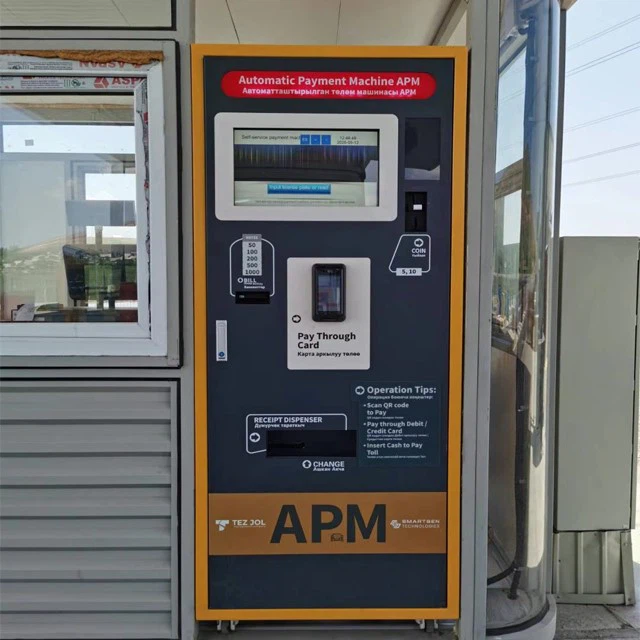
Confirm that each module (touch screen, cash-handling component, code-scanning component, and so on) is firmly installed, sensibly laid out and ergonomically designed.
2. Power supply and grounding
- Confirm that the supply voltage meets local standards (such as 110V/220V) and that the grounding resistance is below 4 ohms, so the equipment operates safely.
3. Module function tests
-
Touch screen: check that the display is clear, the touch response is sensitive and the operating interface is user-friendly.
-
Cash acceptance and change: test the banknote and coin acceptance functions to make sure multiple denominations are recognized and correct change is returned.
-
Code-scanning component: verify that scanning works properly and supports multiple payment methods, such as QR-code payment.
-
Receipt printing: check that printing works normally and that the printed content is clear and accurate.
-
IP network intercom component: test the remote intercom function and make sure audio input and output are normal.
II. Software and network configuration
1. Network connection
-
Make sure the device is connected to a stable network, supports both wired and wireless connections (such as Wi-Fi or 4G-LTE), and is configured with the correct IP address.
-
Test network latency to ensure fast, stable data transmission.
2. Software function tests
-
License plate recognition: enter a license plate number and confirm that the parking information is accurate.
-
Payment methods: test multiple options such as banknotes, coins, bank cards and code-scan payment to ensure transactions are safe and reliable.
-
Voice prompts: check that the voice broadcast function works and that user instructions are clear.
3. Data security and privacy
-
Ensure the device complies with local privacy regulations (such as GDPR) and encrypts user data.
-
Set a data retention period to avoid the risk of data leaks.
III. User interaction and operation
1. Operating interface
-
Confirm that the interface language supports the local language and that the operation flow is simple and intuitive.
-
Test the operation flow to make sure users can complete payment easily.
2. Exception handling
-
Test how the device responds to faults, for example whether the remote intercom function works properly.
-
Confirm that the device can offer alternative payment methods or prompt users to contact customer service when there is no network or a system failure.
IV. Environmental adaptability
1. Climate adaptation
-
Make sure the device can operate normally under local climate conditions, such as high temperature, low temperature and high humidity.
-
In areas with extreme climates, add auxiliary equipment such as sunshades and heating sheets.
2. Installation location
-
Choose a suitable installation site to avoid direct sunlight, rain erosion and vehicle collisions.
-
Make sure the device is installed firmly to prevent damage from uneven ground or vibration.
V. Maintenance and support
1. Maintenance convenience
-
Confirm that the device uses a modular design to make maintenance and parts replacement easier.
-
Check whether the device supports remote maintenance and upgrades.
2. Technical support
-
Make sure the manufacturer provides comprehensive technical support, including remote assistance and on-site services.
-
Provide detailed user manuals and operation guides for users and maintenance personnel.
By following the steps above, you can ensure that the parking self-service payment machine achieves optimal performance during debugging, meets user needs and complies with local regulations.